Yesterday I posted up my weekly special and a tutorial on how to create and implement the "Buy Now" button. If you missed it, just click here! I know sometimes you look at an idea like that and you say, "wow, that's cool, now how on earth can I make it work for me?" So here are a few ideas about how you can sell on your blog - how you can make it work for you :)
There are two big areas that I can think of right now when it comes to selling on your blog. Now, there are probably more, but this is what comes to mind when I think of what I've seen out there on the blogs. The first of those is featuring one of your wonderful creations!
Now when I feature one of my items I like to put it out here on sale, but don't feel like you have to! That's not as important as getting your item out there and featured. I like having my weekly sale special, but you can also simply use the Buy Now button when you unveil a new creation on your blog.
If your going to be featuring an item in your side bar to sell I think it's important to rotate items on a fairly consistent basis. I've chosen to do this weekly, but the idea is that it keeps your blog looking fresh, and you never know what item will appeal to your blog readers! I wouldn't recommend changing it daily though. You want to give your readers a few days to notice, fall in love with, and decide they can't live without your product!
The other big way that I've seen the Buy Now button used is when the artist has a pattern or a kit that they've created. This is an item that they leave up all the time. I've known several artists that have been quite successful at selling patterns through their blogs this way!
Don't have a pattern or a kit to feature? Do you do custom orders? If you have a particular item that your regularly do custom orders on, so you have a set price, you can list that on the side bar. I plan on doing that soon .... so check back if you want to see more of what I mean!
Any more ideas? Leave me a comment!
Showing posts with label buy now. Show all posts
Showing posts with label buy now. Show all posts
Weekly Special and a Tutorial
Hey everyone! It's time to change up the weekly special on my blog! This week we're moving onto my "Simple and Fun Earrings" section in my shop. I love these earrings because they'll go with jeans and just about ANYTHING.
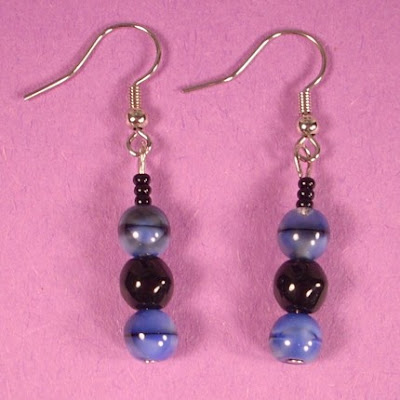
You can buy them now from this blog post or the side-bar widget for only $6! That includes shipping to anywhere in the world and a 20% discount. How sweet is that?
Want to learn how to sell an item on YOUR blog? Just follow these (hopefully) easy steps.
1. Pick the item your going to sell.
2. Upload a picture of that item to a photo storage service on-line. I like to use photobucket. DON'T use Flickr because that's a violation of their TOS. The picture should be about 200x200 pixels to best fit in your sidebar. You may need to experiment to find the best size if your sidebars are a different width than mine.
3. Leave your photo storage account open and open up your blogger dashboard.
4. Click on "layout"
5. Click on "Add a Gadget" (once you've done the initial set up you can go in and edit it from week to week by clicking "edit")
6. Choose the widget for HTML/JavaScript
7. Choose a title.
8. Leaving that window open return to your photo storage account. You'll have to figure out how your particular site works - but there should be an option to share the image (in photobucket, click on "share").
9. Copy the html code to share the image.
10. Go back to your window with the html widget and paste in the html code.
11. Enter a brief description of the item your selling.
12. Leave that window open and open up a new window for your paypal account.
13. Log into Paypal.
14. At the top of your paypal page is a bar that lists different options. Click on "Merchant Services." That will take you to a page that looks like this:
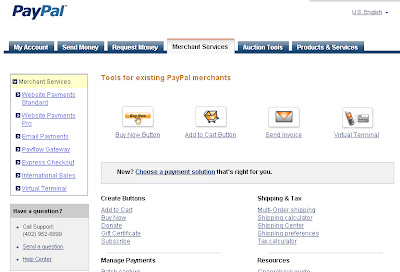
15. Click on the Buy NoW option.
16. Fill out the required information to best suit your needs.
17. Click "Create Button." That will take you to a page that looks something like this:
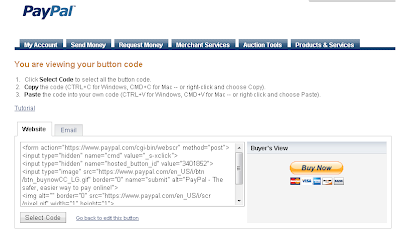
18. Highlight and copy the code under the "website" option.
19. Past the code at the bottom of your HTML widget window.
20. Click "Save"
21. In your Layout window make sure you click "save" again.
22. Go to your blog and admire your hard work!
I know there are a lot of steps - I hope I was able to keep it from getting to confusing! Tomorrow I will be giving some ideas of different things you can do on your blog to sell :) See you then!

You can buy them now from this blog post or the side-bar widget for only $6! That includes shipping to anywhere in the world and a 20% discount. How sweet is that?
Want to learn how to sell an item on YOUR blog? Just follow these (hopefully) easy steps.
1. Pick the item your going to sell.
2. Upload a picture of that item to a photo storage service on-line. I like to use photobucket. DON'T use Flickr because that's a violation of their TOS. The picture should be about 200x200 pixels to best fit in your sidebar. You may need to experiment to find the best size if your sidebars are a different width than mine.
3. Leave your photo storage account open and open up your blogger dashboard.
4. Click on "layout"
5. Click on "Add a Gadget" (once you've done the initial set up you can go in and edit it from week to week by clicking "edit")
6. Choose the widget for HTML/JavaScript
7. Choose a title.
8. Leaving that window open return to your photo storage account. You'll have to figure out how your particular site works - but there should be an option to share the image (in photobucket, click on "share").
9. Copy the html code to share the image.
10. Go back to your window with the html widget and paste in the html code.
11. Enter a brief description of the item your selling.
12. Leave that window open and open up a new window for your paypal account.
13. Log into Paypal.
14. At the top of your paypal page is a bar that lists different options. Click on "Merchant Services." That will take you to a page that looks like this:

15. Click on the Buy NoW option.
16. Fill out the required information to best suit your needs.
17. Click "Create Button." That will take you to a page that looks something like this:

18. Highlight and copy the code under the "website" option.
19. Past the code at the bottom of your HTML widget window.
20. Click "Save"
21. In your Layout window make sure you click "save" again.
22. Go to your blog and admire your hard work!
I know there are a lot of steps - I hope I was able to keep it from getting to confusing! Tomorrow I will be giving some ideas of different things you can do on your blog to sell :) See you then!

Adventure Necklace - On Sale!
 Those of you who've been around my shop and blog for awhile will probably recognize this piece - but now it's on sale through my blog only! Normally this piece sells for $20 plus shipping and handling, but if you buy it here you'll only pay $17.50 plus $2 shipping for anywhere in the world!
This beautiful necklace will fill you with a sense of adventure as you where it proudly around your neck! It's made from a combination of Red Tiger Eye and Red Aventurine. Neither stone is truly red in color, all though that's the official designation. The Tigereye is a deep brown with swirls of a lighter color that appears as if a tiger is staring right back at you. The Aventurine is an orange/brown and the smaller round beads are more beige in color. It's a beautiful combination and what I'd want to wear if I was going on a photo safari!
The necklace is approximately 19 inches in length and uses a hook clasp to make it easy to put it on by yourself! Let me know if you need a different length and I can easily adjust it for you.

Gemstone Lore:
Red Tigereye - This is the birthstone of the Gemini (May 21st - June20th). It is thought to promote clarity vision and assist with the focusing of the mind.
Aventurine - This is the Taurus birthstone (Apr 20 - May 20th). It is thought by some to promote adventure and by some to promote healing.
Subscribe to:
Posts (Atom)